If you’ve been trying to build a pet brand online, whether that’s a blog, an animal rescue page, a training/breeding service, or even social media presence, you already know visuals matter.
A cute cat photo can get someone to stop scrolling, a well-designed pin can send traffic to your blog for months or a clean product image can influence whether someone clicks “buy.”
The challenge though is, that most pet creators do not have time to learn Canva, Photoshop, or five different apps just to get one graphic done.
That’s exactly why I want to share the opportunity of Wealthy Affiliate’s Image Studio with you. Its the AI image creation and editing tool that has completely shifted how we are able to design and create content.
It makes your life so much easier by saving you time, money and the stress that comes with creating.
And the best part is that you can try it for free. Every new Starter member gets 2,000 free AI credits the moment they join Wealthy Affiliate, so you can test everything without paying a cent.
Now even though this is a great opportunity, I want to make sure you get the best out of your trial period so lets walk through what this tool is, what is has to offer you and how you can use it in your online business.
TL;DR Wealthy Affiliate Image Studio Review
Wealthy Affiliate’s Image Studio is an all-in-one AI image creation and editing tool that helps petpreneurs and other entrepreneurs design professional visuals in seconds. You can generate custom images, create Pinterest pins, YouTube thumbnails, product mockups, logos, social graphics, and blog headers without needing Canva, Photoshop, or design skills. It’s fast, beginner friendly, built directly into the WA ecosystem, and perfect for bloggers or anyone building a business online. New members get 2,000 free AI credits to try it out immediately.
Summarize This Content With AI
What Is Image Studio? (In Simple Pet Creator Language)
Think of Image Studio as your 24/7 personal pet graphic designer and brand stylist without needing Canva, Photoshop or any stock image platform.
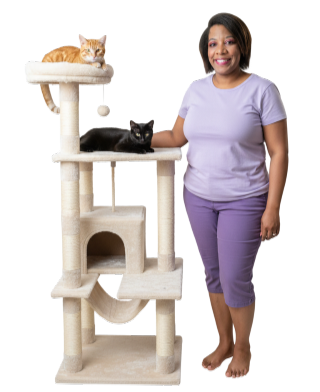
You can use it to:
- Create original pet images in seconds like the one I created of myself to the right
- Add or remove backgrounds (image to the right)
- Generate pet product mockups, logos and other brand related imagery
- Resize images for Instagram, Pinterest, YouTube, and TikTok
- Make Pinterest pins that actually get clicks
- The Pinterest pins that I used Image Studio for get more than double the views of pins I created in other ways.
Imagine being able to generate your ideas in just a couple of clicks without needing pro design skills.
Why Image Studio Is So Useful for Pet Entrepreneurs
1. You Can Create Animal Images That Don’t Exist Yet
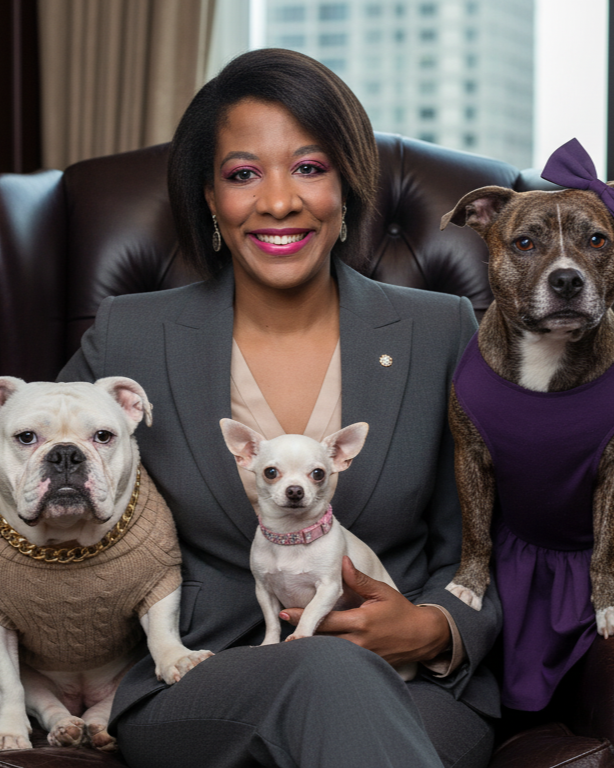
Need a lizard wearing a tiny hat for your reptile accessories blog?
Type it in. Done.
Or how about a Husky in the snow for your winter care article? Done.
Or how about a professional picture of you inspired by your own pets like the brand image I created inspired by me and some of my dog rescues.
Literally, anything you can imagine, Image Studio can bring to life, which is perfect when your content ideas are bigger than the photos you actually have.
2. Perfect for Product Reviews & Affiliate Marketing
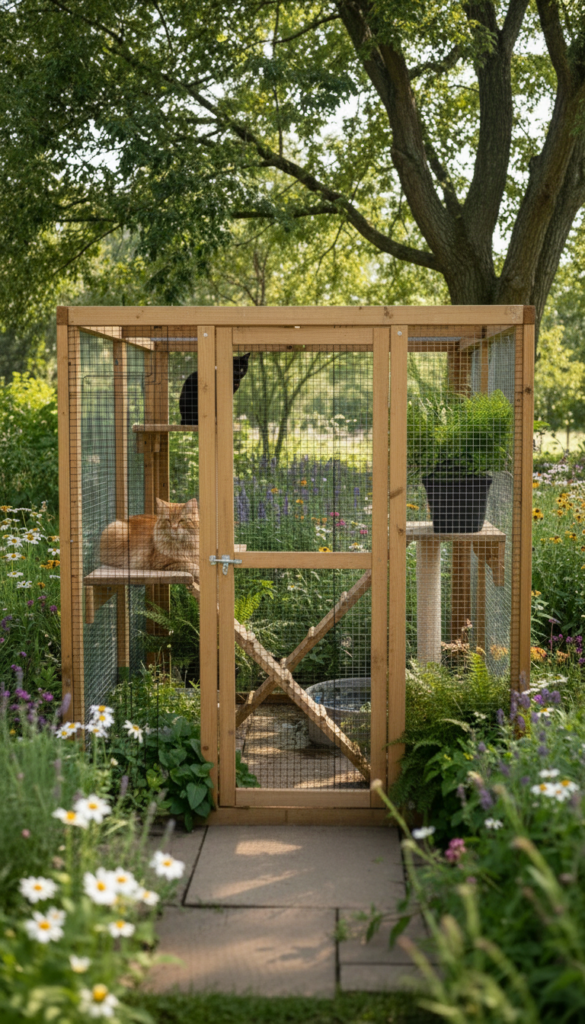
I’ll use my case study site, Outdoor Cat Enclosures, as an example. This image is one of my top performing pins on Pinterest, with over 7k impressions, 230 clicks, and 70+ saves, that I created using Image Studio. Some other things you can use it for are:
- Feature/Thumbnail images
- Comparison graphics
- Before/after visuals (Checkout this video to see it in action)
- Attention-grabbing Pinterest pins
- Product demonstration mockups
Pet readers LOVE visuals and they also love seeing the animals they enjoy most. Image Studio helps you create them quickly, beautifully, and without needing to be a designer.
3. Resize Images Instantly (Seriously, This Saves Hours)
If you’ve ever created a graphic you loved, and then realized you needed a different size or ratio, I’m right there with you because it happens all the time to me too. It used to be so annoying but not anymore because with Image Studio I can resize and set the exac image ratio I want so AI is better prepared to get it right
4. Editing Tools for Pet Photos = Magic
Remember earlier, the image of me standing next to the cat tree? It looked like this at first but I was able to easily, and very cleanly remove the background. Iykyk, not all background removers are built the same. ImageStudio is one of the cleanest background removers I’ve used.
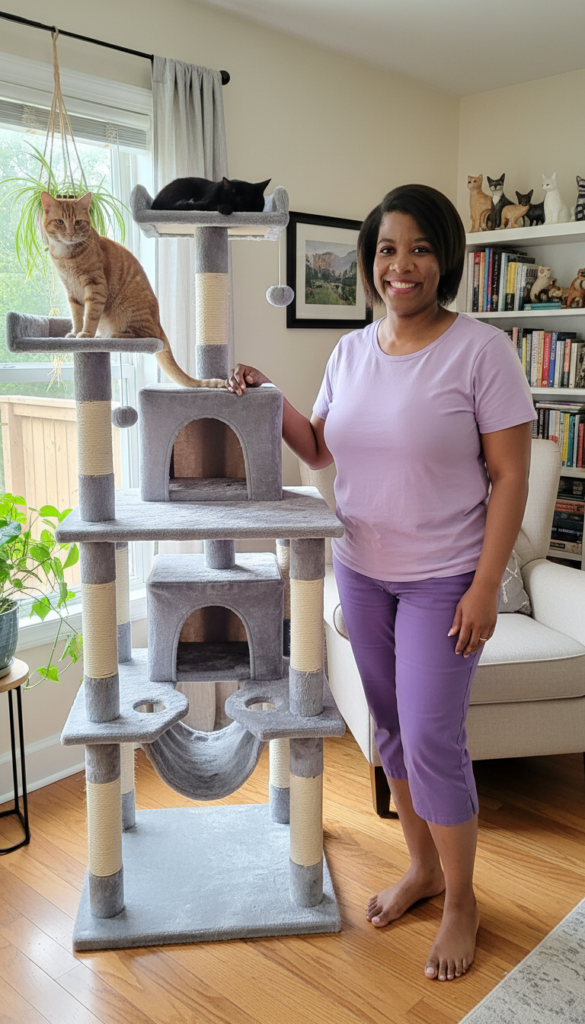
And to set the record straight, yes, I am this tall (as tall as a cat tree). My cats can’t escape me up their cat tree but you can see the quality in that I look regular. I only gave it a headshot of me and a general description for this picture. It really did a good job here.
Some more examples of what you can do with it are:
- Remove backgrounds
- Clean up messy floors in pet photos
- Brighten fur and scenery details
- Add text
- Create lighting ambiance
This is a real game changer in the content creation world.
You could have a nice picture of your cat but the background is messy. You can reference the cat and put it on a different background that you define or you can have the ImageStudio AI design it for you.
5. Great for Pinterest and My Pins Are Doing Extremely Well
I can’t lie. Pinterest loves ImageStudio images. As I mentioned earlier, the imagery for my top performing pins for Outdoor Cat Enclosures have been created with on ImageStudio. I have tried other AI generators but they don’t even come close, though they do still get engagements.
Some other ideas of what you can design for Pinterest are:

- animals
- vibrant images of custom scenes
- clean text
- lifestyle scenes
When you use ImageStudio, I strongly believe that you can also come to expect:
- Higher impressions
- More outbound clicks
- Better brand consistency
- Longer-lasting traffic
Because Image Studio produces clean, eye-catching, professional images that fit exactly what Pinterest, and more importantly, Pinterest users, gravitate to.
6. Built-In Monetization Opportunities
The opportunity to generate income for pet creators doesn’t just stop at your own platforms. You can also use Image Studio to SELL:
- Social packs for other pet brands
- Custom dog or cat portraits
- Printable animal-themed art
- KDP activity books
- Merch designs (shirts, mugs, stickers)
- YouTube thumbnails for pet channels
- Logo sets for grooming or training businesses
The possibilities are endless. This tool doesn’t just help you make content. It helps you make income.
If you want to give it a try for free, remember to grab your 2,000 credits that you can use to tryout ImageStudio or any of the other AI powered tools Wealthy Affiliate has to offer.
Grab your credits and follow along!
Get 2000 AI Credits Free To Start Creating Your Online Business 👉🏾
Let’s Create A Pet Image Together (Quick Walkthrough)
As much as it can do, the Image Studio tool itself is pretty straight-forward to use and customize your specifications.
Step 1: Register for Wealthy Affiliate’s Free Plan
First of all, in order to get access to ImageStudio, you have to have a Wealthy Affiliate account. But don’t worry because it is free to join and no credit card required so you’re not locking in to anything. You can click here or the button below to sign-up now.
Step 2: Navigate to ImageStudio
When you arrive on the Wealthy Affiliate platform, you’re going to see some post highlights and community activity.
In the top left hand side of your screen, you’re going to see the menu hamburger (three stacked long dashes). Click that to open up the main menu.
Scroll until you see ‘Tools’.
Click that and then navigate to Image Studio and the platform design area will come up as shown in the below screenshot.
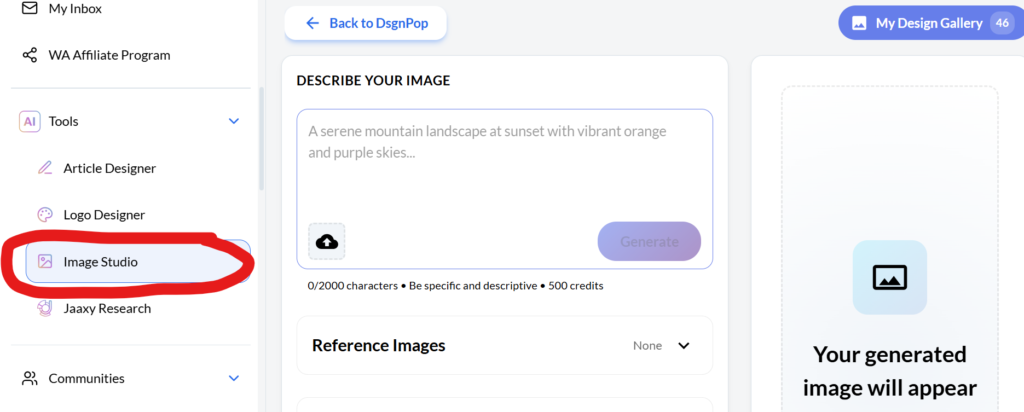
Step 2: Describe What You Want
For example, in my video walk-through I show you several examples of both detailed and less detailed requests for images.
Example prompts are like:
- “Create an image of me smiling, next to a cat tree on a transparent background. I’ve attached a picture of me. I’m as tall as the cat tree, wearing a pair of purple capris and light purple t-shirt. I am medium weight.”
- “Use the attached images to create an image of my husband and I applying reef safe sunscreen to our daughters” then go into specific details if you have any.
- “I’m writing a post called (ABC name) and need a thumbnail (ABC ratio) that depicts something related to the article”
The more detail you give, the better the output but sometimes I don’t know what to put and just let AI design it and go from there.
Step 3: Refine & Edit
Add in more content and details for the AI image generator to use like:
- Reference Images
- Image Size
- Art Style
- Any last minute details that come to mind
This is where your pet brand personality really shows. Don’t be afraid to get a little creative here too.
Step 4: Generate & Review
Once the image has been generated you will have a better idea of if you are happy with it or want to make some changes.
One tip is to create your image in steps. For instance, the one that I shared of me my pets and my daughters happened in several steps.
I also defined what style I wanted the video to take on (ex. old money, new money) and what I wanted them wearing.
I hope this helped you get an idea of what is possible but the sky is really the limit. Content creation is not the only thing that you can use images for which we’ll go over a bit in the next section.
Real Examples of What Pet Creators Can Make
Here are some random things off the top of my head that you can create outside of content creation:

- A dog grooming flyer for your local business
- A “Top 10 Cat Toys” YouTube thumbnail
- A Pinterest pin for your rabbit care blog
- An ebook cover for “Puppy Training 101”
- A printable “Daily Pet Care Checklist”
- A logo for your grooming or pet-sitting brand
- A product image for your Etsy pet store
- Cartoons of dogs, cats, birds, reptiles, in any style you imagine
And you can swap any animal into these ideas. So and ebook cover for “Puppy Training 101” could be a “Cockatiel Training 101” ebook cover.
This is why Image Studio is such a powerful tool for the pet niche and you don’t need to wait for the perfect time to get the perfect photo anymore. Or even if you don’t feel like washing the dog, you can still create something high-quality with old pictures you have.
Why Pet Entrepreneurs Should Care About Image Studio
Bottom line, visuals SELL. Even reading this review, if there was no visuals, it would be boring or/and hard to understand sometimes.
Animal content is one of the highest-performing categories on the internet because:
- People love seeing animals
- The pet niche is emotional
- Visuals build instant trust
- Cute animals increase click-through rates
- Graphics make info easier to understand
Image Studio gives pet creators the ability to produce the kind of visuals that attract readers, customers, and clients.
No complicated software. No technical learning curve.
Its a fast, fun, powerful AI image creator built right into your Wealthy Affiliate account.
Frequently Asked Questions About Using Image Studio for Pet Businesses
Can I use Image Studio to create animal photos even if I don’t have professional pictures?
Yes. Image Studio can generate completely original animal images from your prompts. You can click here to see it in action on my YouTube channel but whether you need a fluffy cat, a cartoon-style dog, a realistic reptile, or a staged product photo, you can create it in seconds without needing a camera or a pet model.
Is Image Studio good for creating Pinterest pins for my pet blog?
Absolutely. Image Studio is built for fast Pinterest pin creation. You can select the correct dimensions, design a pin with clean text, and even generate background images that match your niche. Many pet creators (including me) are seeing great Pinterest results using Image Studio-generated pins. See it in action here on my YouTube channel.
Can I use Image Studio for product reviews in the pet niche?
Yes. You can create polished feature images, comparison visuals, demonstration mockups, and even lifestyle backgrounds for pet products like cat trees, dog toys, feeders, grooming tools, or aquariums. These visuals make your reviews look more professional and boost trust with readers.
Do I own the images I create with Image Studio?
Definitely. Image Studio was created with beginners in mind. You choose your canvas size, type in a simple prompt, and the system does the rest. You can also use built-in editing tools, templates, and suggestions to help shape your design without needing any graphic design experience.
Will Image Studio help me grow my pet brand on multiple platforms?
Yes. Because you can resize images instantly, you can create versions for Pinterest, Instagram, Facebook, YouTube thumbnails, and TikTok covers in one workflow. This saves time and helps you stay consistent across platforms.
How many images can I create with the 2,000 free credits?
Starter members receive 2,000 AI credits, which is enough to create 4 high-quality images. If you want more credits you can get them by upgrading to a premium package.
Can I use Image Studio to create visuals to sell?
Yes. Many creators use Image Studio to produce items like pet-themed printable art, custom pet portraits, merch designs, business logos, or social media packs for local groomers and trainers. It is a monetizable tool, not just a design tool.
Is Image Studio useful for pet service businesses?
Very. Groomers, trainers, walkers, sitters, rescues, and breeders can create flyers, banners, event graphics, promotional posts, and branded content to help market their services. No outside software Is needed.
Do I need additional software like Canva?
Not necessarily though you can use it if you want to. All of the creating, editing, resizing, downloading, etc happens inside the Wealthy Affiliate ecosystem. You don’t need Photoshop, Canva, or stock photo subscriptions unless you personally prefer them.
Image Studio Is a Game Changer for Pet Creators
Whatever you are doing in the pet niche, you need visuals. Image Studio gives you:
- unlimited creativity
- a single ecosystem for your brand
- professional-level visuals
- faster workflows
- and more ways to make money
It’s one of the most useful tools I’ve added to my own repituar, and I genuinely think it will help anyone trying to grow an animal-based business online.
With the 2,000 free AI credits for new Starter members, it’s worth trying even if you’re brand new.
It takes seconds to get your first image and from there, your creativity carries the rest.
So come join me and many others as we create, build and grow our business presence online. Click the button below to get started with Image Studio today!
Start Your Online Business With Support That Makes It Easier
I learned everything I know about building income online from a single resource that finally gave me the training, tools, and support I needed. Wealthy Affiliate brought it all together in one place and made the process so much easier to follow. It can do the same for you as you start your own online business.
Love that pet owners can create such awesome images with this platform. It’s truly unique! Great job on this article. People need to know they’re missing out. AND it’s really easy to use. Plus it’s FREE to sign up! Not just petrepreneurs as you call it, but any niche for that matter!
Cheers! Jeremy
Hi Jeremy,
Thank you for the thoughtful comment. I am glad you pointed out how accessible the tool is, because that is one of the biggest benefits. You do not need design experience to create useful images, and that makes a real difference for people who want to focus on content instead of struggling with visuals.
You are also right that this goes far beyond the pet niche. Once people understand how it works, they can adapt it to almost any topic they are building around.
I appreciate you taking the time to share your perspective.
Marlinda
Internet Incomes
Helping pet lovers and parents turn their passion into online income
This is an excellent review that covers all aspects of the Image Studio at Wealthy Affiliate. I especially like the walk-through. I found it most helpful indeed.
Thanks,
Michael
Hi Michael,
Thank you so much for the kind feedback. I am really glad the walkthrough stood out and helped you get a clearer picture of how Image Studio works in a practical way. That was exactly my goal with this review, to show how it can actually be used day to day rather than just listing features.
If you decide to experiment with it more, it is a great tool for speeding up content creation, especially when you want visuals that match your niche without overthinking the design side.
I appreciate you taking the time to leave a thoughtful comment.
Marlinda
Internet Incomes
Helping pet lovers and parents turn their passion into online income